Making a New Page
Make sure you’re adding a Page and not a Post, since Posts are only displayed on the blog (which I set to the
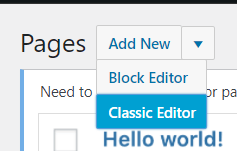
For new pages I prefer the classic editor just because it’s a lot easier to use. In the new style editor, if there’s a large amount of text you have to scroll to the top of the page itself and not in the little text box thingy to edit what you’ve selected and it pissed me off so I use this instead
When it comes to adding individual pages, the box that says “Page Attributes” on the right is how to make things more oraganised

The heirearchy is basically “Translation by Group,” “[GROUP NAME],” “[RELEASE NAME],” and then the song itself. Select the release to put it under. I was really lazy and for songs on multiple releases I just reused the same page to get things done quicker, but if we do color coding by release i’ll probably have to fix that, sorry!
Syntax
For the overall style guide of the lyric pages, make sure per line you hold down shift when you press enter at the start of a new line
So it comes out like this
and not like this
Except for new verses of course.
If you copypaste something from a website (like mojim for lyrics) and it ends up with the ugly line spacing
like this
and not the one you want like this, try copying the text into Discord’s message box and then re-copy the text from that and it should retain the structure of the song.
Also for headings, select the box that says “paragraph” and all heading text like “English” or “Romaji” is “heading 2” but if you have translator notes, use one of the smaller ones.
Adding Hyperlinks
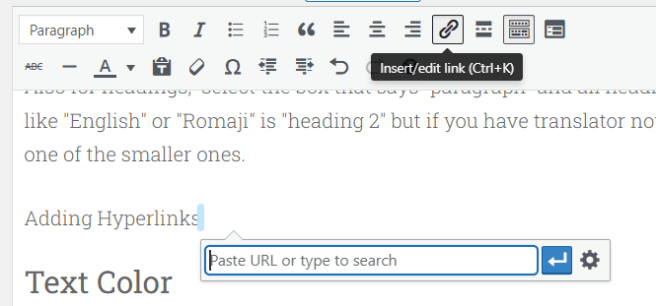
Just highlight the desired text and press the link button, you don’t have to copypaste the entire URL if it’s one on the site, you can just type the name of the page. For things that have the same title, the most recent one made will be the one cloest to the top of the list that appears, so you won’t accidentally link to say GANG PARADE the group page instead of GANG PARADE the song.
Text Color
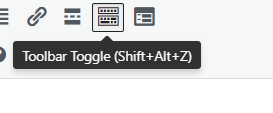
To see the color coding options, press this and then they’ll appear if they aren’t there from the start.
Adding Images
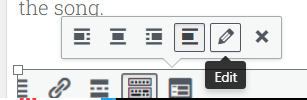
To get images to be their original size and not look like shit, click the image and press that little pencil
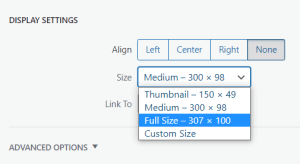
Then select full size on the menu on the page that comes up.
 going going WACK